Street Network Analysis: Nodes and Paths (OSM data)#
[1]:
import osmnx as ox, networkx as nx, matplotlib.cm as cm, pandas as pd, numpy as np
import geopandas as gpd
%matplotlib inline

import warnings
warnings.simplefilter(action="ignore")
pd.options.display.float_format = '{:20.2f}'.format
pd.options.mode.chained_assignment = None

import cityImage as ci
Ininitialising path, names, etc.
[2]:
city_name = 'Torino'
epsg = 32632
crs = 'EPSG:'+str(epsg)
Downloading the data from OpenStreetMap#
Choose the name of the place that represent your case-study area. When the case-study area does not coincide with the entire extension of a city, it is suggested to include the case-study area’s surroundings (e.g. buffer of 2000 mt from the centre of the area, depending on its extension) so to avoid the edge effect when computing the centrality measures.
Choose between the following methods:
OSMplace, providing an OSM place name (e.g. City).OSMpolygon, provide a Polygon (coordinates must be in units of latitude-longitude degrees).distance_from_address, providing a precise address and setting thedistanceparameter (which is otherwise not necessary)
[3]:
place = 'Torino, Italy'
download_method = 'OSMplace'
distance = None

nodes_graph, edges_graph = ci.get_network_fromOSM(place, download_method, 'walk', distance = distance, epsg = epsg)
Cleaning and simplyfing the Street Network#
At the end of the previous section two files are obtained: nodes and edges (vertexes and links). Below, before creating the actual graph, the two datasets are cleaned, simplified and corrected.
Cleaning functions handle (through boolean parameters):
Duplicate geometries (nodes, edges).
Pseudo-nodes.
remove_islands: Disconnected islands.dead_endsDead-end street segments.self_loopsSelf-Loops.same_vertexes_edgesEdges with same from-to nodes, but different geometries.fix_topologyThis creates nodes and breaks street segments at intersections. It is primarily useful for poorly formed datasets (usually OSM deerived networks are topologically correct). It accounts for segments classified as bridges or tunnels in OSM.
same_vertexes_edges handles edges with same pair of u-v nodes but different geometries. When True, it derives a center line between the two segments, unless one of the two segments is longer than the other (>10%). In this case, the shorter segment is deleted.
[4]:
nodes_graph, edges_graph = ci.clean_network(nodes_graph, edges_graph, dead_ends = True, remove_islands = True,
                            same_vertexes_edges = True, self_loops = True, fix_topology = False)
[5]:
plot = ci.plot_gdf(edges_graph, black_background = False, figsize = (10,10), title = city_name+': Street Network',
                   color = 'black')

[6]:
# Obtaining the graph from the case-study area and computing the centrality measures
graph = ci.graph_fromGDF(nodes_graph, edges_graph)
Node centrality#
On the primal graph representation of the street network, the following centrality measures are computed on nodes, on the basis of road distance:
Road Distance Shortest Path Betweenness centrality (
Bc_Rd).Straightness centrality (
Sc) (see Crucitti et al. 2006).Reach centrality (e.g.
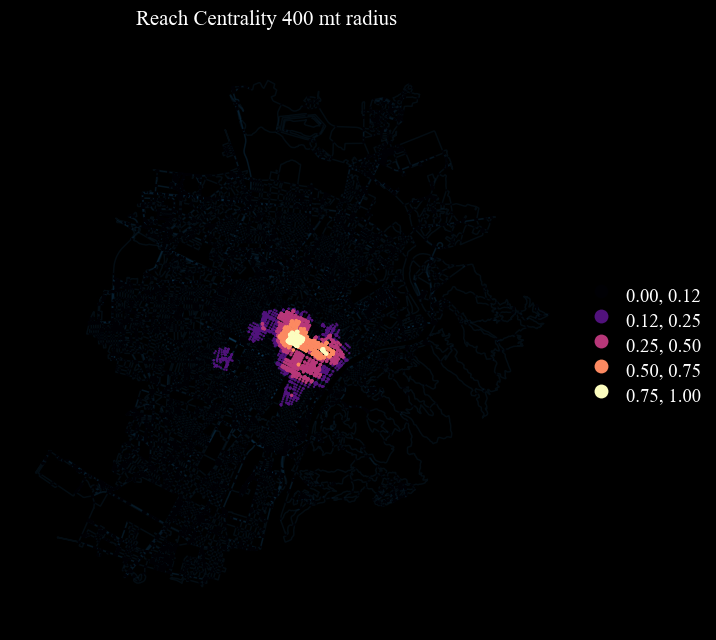
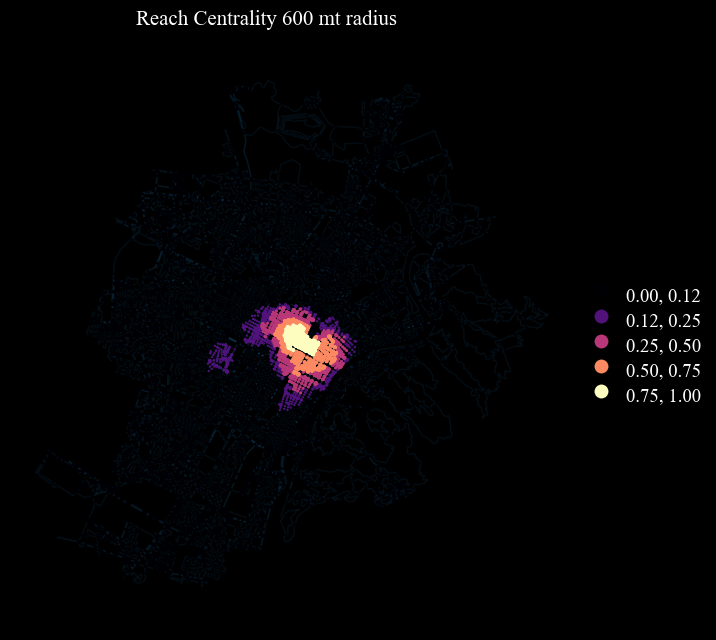
Rc_400,Rc_600) (readataped from Sevtsuk & Mekonnen 2012) - it measures the importance of a node based on the number of services (e.g. commercial activities) reachable by that node (for instance within a buffer).
measure accepts betweenness, reach, straightness, closeness. The function returns dictionaries, which are going to be merged in the GDF below.
The first measure (Bc_Rd) is here used to identify “Lynchian” nodes.
[7]:
# betweenness centrality
Bc_Rd = ci.calculate_centrality(nx_graph = graph, measure='betweenness', weight='length')
# straightness centrality
Sc = ci.calculate_centrality(nx_graph = graph, measure='straightness', weight='length')
Choose which of the following amenities you consider relevant as “services” for computing reach centrlality. Check OSM amenities for details
[8]:
amenities = ['arts_centre', 'atm', 'bank', 'bar', 'bbq', 'bicycle_rental', 'bicycle_repair_station', 'biergarten',
             'boat_rental', 'boat_sharing', 'brothel', 'bureau_de_change', 'cafe', 'car_rental', 'car_sharing', 'car_wash', 'casino', 'childcare',
           'cinema', 'clinic', 'college', 'community_centre', 'courthouse', 'crematorium', 'dentist', 'dive_centre', 'doctors',
           'driving_school', 'embassy', 'fast_food', 'ferry_terminal', 'fire_station', 'food_court', 'fuel', 'gambling', 'gym',
           'hospital', 'ice_cream', 'internet_cafe', 'kindergarten', 'kitchen', 'language_school', 'library', 'marketplace',
           'monastery', 'motorcycle_parking', 'music_school', 'nightclub', 'nursing_home', 'pharmacy', 'place_of_worship',
           'planetarium', 'police', 'post_office', 'prison', 'pub', 'public_building', 'ranger_station', 'restaurant', 'sauna',
           'school', 'shelter', 'shower', 'social_centre', 'social_facility', 'stripclub', 'studio', 'swingerclub', 'theatre',
           'toilets', 'townhall', 'university', 'veterinary']
[9]:
# reach centrality pre-computation, in relation to Point of Interests or any other point-geodataframes
services = ox.features_from_place(place, tags = {'amenity':True}).to_crs(epsg=epsg)
services = services[services.amenity.isin(amenities)]
services = services[services['geometry'].geom_type == 'Point']

# using a 50 mt buffer
graph = ci.weight_nodes(nodes_graph, services, graph, field_name = 'services',  radius = 50)

# Reach Centrality
Rc400 = ci.calculate_centrality(nx_graph = graph, measure='reach', weight='length', radius = 400, attribute = 'services')
Rc600 = ci.calculate_centrality(nx_graph = graph, measure='reach', weight='length', radius = 600, attribute = 'services')
[10]:
## Appending the attributes to the geodataframe
dicts = [Bc_Rd, Sc, Rc400, Rc600]
columns = ['Bc_Rd', 'Sc', 'Rc400', 'Rc600']
for n,c in enumerate(dicts):
    nodes_graph[columns[n]] = nodes_graph.nodeID.map(c)
Visualisation#
[11]:
columns = ['Bc_Rd', 'Sc', 'Rc400', 'Rc600']
titles = ['Betweennes Centrality - Shortest Path',
         'Straightness Centrality', 'Reach Centrality 400 mt radius', 'Reach Centrality 600 mt radius']
Parameters#
Plot properties (optional):
black_backgroundblack background or whitefigsize: size of the figure’s side extent (15,10)legend: if True, show the legendaxes_frame: if True, it shows an axis framefontsize: the fontsize for texts
What to plot (some may be required, depending on the function):
gdf: the gdf to plot (only for the functionsplot_gdfandplot_grid_gdf_columns)gdfs: list of GeoDataFrames to plot (only for the functionplot_grid_gdfs_column)
column: the column of the gdf on which building the visualisation (only for the functionsplot_gdfandplot_grid_gdf_columns)columns: list of the columns on which building the visualisation (only for the functionplot_grid_gdf_columns)
How to plot (optional):
scheme: the classification method, choose amongst: https://pysal.org/mapclassify/api.htmlbins: bins defined by the userclasses: nr classes for visualising when scheme is not Nonenorm: a desired data normalisation into a [min, max] intervalcmap: see matplotlib colormaps for a list of possible values or pass a colormapcolor: categorical color applied to all geometries when not using a column to color themalpha: alpha value of the plotted layergeometry_sizepoint size or line with value values, based on the geometrygeometry_size_factor: when provided, it rescales the column provided, if any, from 0 to 1 and it uses the geoemtry_size_factor to rescale the markersize or the linewidth accordingly (e.g. rescaled variable’s value [0-1] * factor), when plotting a Point GeoDataFramecbar: if True, show colorbar, otherwise don’t; when True it doesn’t show legend. Related paramters are:cbar_shrink: fraction by which to multiply the size of the colorbar.cbar_ticks: number of ticks along the colorbarcbar_max_symbol: if True, it shows the “>” next to the highest tick’s label in the colorbar (useful when normalising)cbar_min_max: if True, it only shows the “>” and “<” as labels of the lowest and highest ticks’ the colorbar
gdf_base_map, provide a GeoDataFrame that should be used as base-map. Related paramters are:base_map_gdf: a desired additional layer to use as a base mapbase_map_colorcolor applied to all geometries of the base mapbase_map_alpha: base map’s alpha valuebase_map_geometry_size: base map’s markersize or linewidth when the base map is a Point GeoDataFrame or a LineString GeoDataFramebase_map_zorder: zorder of the layer; e.g. if 0, plots first, thus main GeoDataFrame on top; if 1, plots last, thus on
Only for grid-like plot (multi gdfs or multi columns):
nrows: number of rows of the subplotncols: number of columns of the subplot
nrows x ncols must be equal (or +1) to the lenght of the gdfs or columns passed.
Grid visualisation#
[17]:
cbar_dict = {'cbar' : True, 'cbar_min_max' : True, 'cbar_shrink' : 0.30}
fig = ci.plot_grid_gdf_columns(nodes_graph, titles = titles, columns = columns, cmap = 'magma', scheme = 'quantiles', classes = 5,
                               figsize = (15,20), nrows = 2, ncols = 2,  geometry_size_factor = 3.5, legend = True)

Single figure visualisation with Lynch derived breaks#
[18]:
# Lynch's bins - only for variables from 0 to 1
scheme_dict = {'bins' : [0.125, 0.25, 0.5, 0.75, 1.00], 'scheme' : 'User_Defined'}

#rescaling values for 0-1 visualisation
for n, column in enumerate(columns):
    nodes_graph[column+'_sc'] = ci.scaling_columnDF(nodes_graph[column])
columns_rescaled = [column+'_sc' for column in columns]

for n, column in enumerate(columns_rescaled):
    ci.plot_gdf(nodes_graph, column = column, title = titles[n], cmap = 'magma',
                geometry_size_factor = 5.5, figsize = (7,7), base_map_gdf = edges_graph, base_map_zorder = 0, base_map_alpha = 0.1,
                legend = True, **scheme_dict)


Paths#
On the primal graph representation of the street network, the following centrality measures are computed on edges:
Road Distance Betweenness centrality.
Angular Betweenness centrality (On the dual graph representation of the street network)
[15]:
# Road Distance betweenness centrality
Eb = nx.edge_betweenness_centrality(graph, weight = 'length', normalized = False)
[16]:
# appending to the geodataframe
edges_graph.drop(['Eb'], axis = 1, inplace = True, errors = 'ignore')
edges_graph = ci.append_edges_metrics(edges_graph, graph, [Eb], ['Eb'])
Dual graph analysis: Angular Betweenness#
Here street-segments are transformed into nodes (geograpically represented by their centroids). Fictional links represent instead intersections. Thus if two segments are connected in the actual street network, a link in the dual graph representation will be created by connecting the corresponding nodes. This process allows taking advantage of angular relationships in centrality measures computation and other network operations.
[17]:
# Creating the dual geodataframes and the dual graph.
nodesDual_graph, edgesDual_graph = ci.dual_gdf(nodes_graph, edges_graph, epsg)
dual_graph = ci.dual_graph_fromGDF(nodesDual_graph, edgesDual_graph)
C:\Users\gfilo\AppData\Local\miniconda3\envs\cityImage\Lib\site-packages\cityImage\graph.py:180: FutureWarning: The behavior of DataFrame concatenation with empty or all-NA entries is deprecated. In a future version, this will no longer exclude empty or all-NA columns when determining the result dtypes. To retain the old behavior, exclude the relevant entries before the concat operation.
  edges_dual = pd.concat([edges_dual, new_row], ignore_index=True)
[18]:
plot = ci.plot_gdf(edgesDual_graph, black_background = False, figsize = (10,10), title = city_name+': Dual Graph representation',
             color = 'black', geometry_size = 0.7)

[19]:
# Angular-change betweenness centrality
Ab = nx.betweenness_centrality(dual_graph, weight = 'rad', normalized = False)
edges_graph['Ab'] = edges_graph.edgeID.map(Ab)
Visualisation
[20]:
columns = ['Eb', 'Ab']
titles = ['Betweenness - Distance SP', 'Betweenness - Cum. Angular Change SP']
cbar_dict = {'cbar' : True, 'cbar_min_max' : True, 'cbar_shrink' : 0.50}

for n, column in enumerate(columns):
    edges_graph[column+'_sc'] = ci.scaling_columnDF(edges_graph[column])

columns_rescaled = [column+'_sc' for column in columns]
plot = ci.plot_grid_gdf_columns(edges_graph, classes = 8, columns = columns_rescaled, titles = titles, geometry_size = 1.9,
                                nrows = 1, ncols = 2, scheme = 'Natural_Breaks', cmap = 'magma', figsize = (15 ,10),
                                **cbar_dict)

Exporting
[114]:
nodesDual_graph.key = nodesDual_graph.key.astype('int64')
[115]:
nodesDual_graph[['key', 'geometry']].to_file(output_path+'_v.gpkg', driver = 'GPKG')
[116]:
# provide path
output_path = '../output/'+city_name

# primal graph
nodes_graph.to_file(output_path+'_nodes.gpkg', driver='GPKG')
edges_graph.to_file(output_path+'_edges.gpkg', driver ='GPKG')

# dual graph
nodesDual_graph.drop('intersecting', axis=1).to_file(output_path+'_nodesDual.gpkg', driver = 'GPKG')
edgesDual_graph.to_file(output_path+'_edgesDual.shp', driver = 'GPKG')